
Earns.io
Earns.ioPayPal and Stripe Skip Your Country. Payhip Pays You Through 13 Processors, at the Moment of Purchase

PayPal and Stripe Skip Your Country. Payhip Pays You Through 13 Processors, at the Moment of Purchase

What this is for

For a creator in a country PayPal and Stripe do not serve who has a file to sell. You get the one store whose payout route actually reaches your bank, the first product live, and a sale that lands in an account in your own name.

What you make

One digital product live and buyable, on the platform whose payout route reaches your country: the processor connected in your own name, the file uploaded, the price set, the listing published, and the first sale landing in an account you can actually withdraw from.

CHECKED 2026-09-1420 SOURCES28 NUMBERSUPDATED 2026-09-16
  • 28 published
  • 0 not published
  • 0 given two ways
What this counts
Typical earnings
Price minus 5% to 10% + $0.50 per sale
Startup cost
$0 at Gumroad, Lemon Squeezy and Payhip
Time to first payout
Same day at Payhip; weekly at Gumroad
Difficulty
2/5

Why this pays

The file is not the hard part. The hard part is that the two processors every tutorial assumes, PayPal and Stripe, do not receive money where you live, so the store you were about to build has no way to pay you. Pick the store by the payout route first and the same file sells from Lagos, Jakarta, Mumbai or Istanbul as easily as from London.

DoorWho it reachesWhat it keeps on each saleWhen the money is yours
Gumroad or Lemon Squeezy, bank payout119 countries each, Albania to Vietnam10% + $0.50, or 5% + 50cAfter a $100 or $50 floor and a 7-day or 13-day hold
Gumroad or Lemon Squeezy, PayPal payoutWhere PayPal receives; 200+ countries at Lemon SqueezyThe same, plus 2% on Gumroad's PayPal routeSame floors and holds
Payhip with your own processorPaystack, Flutterwave, Xendit, Razorpay, Iyzico and eight more5%, plus the processor's own feeAt the moment of purchase, no hold, no floor

The third row is the play. Payhip does not pay you; your own connected processor does, instantly, so the only country question left is whether one of its 13 processors covers you. For most of Africa, South and Southeast Asia and Turkey, one does.

The play, in three lines

  1. Look your country up on the two 119-country bank lists. There: open that store and upload this afternoon.
  2. Not there, but PayPal receives where you live: take the USD route on Gumroad or Lemon Squeezy.
  3. Neither: open Payhip, connect Paystack, Flutterwave, Xendit, Razorpay or Iyzico under Payment Details, then upload the file, set the price, make it Visible. The first sale lands in your own account before the buyer's download finishes.

The path above walks every click. What follows is the reasoning behind each step and the numbers you quote from.

Where the money comes from

  • Buyers on your own link. A stranger anywhere in the world with a card. Payhip's processors take cards from buyers in over 180 countries in Razorpay's case; Paystack, Flutterwave and Xendit take local cards and bank methods your buyers already use.
  • Not the platform. Gumroad, Lemon Squeezy, Sellfy and Shopify hold the buyer's money and pass it on by their rules. Payhip never holds it at all.
  • Nobody in 18 countries, on Lemon Squeezy. It cannot accept payments from customers in Cuba, Iran, Iraq, Lebanon, Libya, North Korea, the Russian Federation, Syria, Yemen and nine more. Know that before you promise a buyer there.

The pain you are selling the cure for

The buyer wants the file now, paid for with the card in their pocket, and a download link that works. The pain is entirely yours: a store that lets you build the whole page, take the sale, and then shows a balance you cannot withdraw, because the payout country dropdown does not have your country in it. Done in the right order, payout route before product page, the whole thing takes an afternoon. Done in the other order, it ends with money on a screen.

The path, step by step

Every figure below is read from the platform profile it belongs to, not written into this page. Follow a name to see every answer we have for that platform.

  1. 1
    Find your country on the bank-payout lists before you build a single product page

    Gumroad pays by bank in 119 countries, each in a named local currency, and 29 of them carry a higher minimum than $100. Lemon Squeezy's bank list is also 119 countries. Shopify Payments covers 40 countries and regions; elsewhere a Shopify store must use a third-party provider and pay 2% on top of the plan. If your country is on a list, the door is the bank and you can skip to the upload.

  2. 2
    If bank payouts skip you, take the PayPal door in USD

    Gumroad pays by PayPal where bank deposits are unavailable, in USD, usually within 1 to 3 business days, with a 2% processing fee, and supports nothing else: no Payoneer, Wise, check or wire. Lemon Squeezy pays PayPal in 200+ countries and regions, always in USD, to a verified Personal or Business account. PayPal itself does not let accounts in some countries receive money, and where Gumroad also has no bank route, such as Zambia, Syria, Russia and Iraq, it has no way to pay you.

  3. 3
    If PayPal skips you too, bring your own processor through Payhip

    Payhip connects 13 processors: PayPal, Stripe, Mollie, Square, Mercado Pago, Flutterwave, Paystack, Xendit, Midtrans, PayU, Razorpay, Iyzico and PayTabs. Paystack covers Côte d'Ivoire, Ghana, Kenya, Nigeria and South Africa; Flutterwave adds Uganda, Rwanda, Zambia, Tanzania and Cameroon; Xendit covers Indonesia, Malaysia, the Philippines, Thailand and Vietnam; Razorpay covers sellers in India; Iyzico covers Turkey. Sellfy takes only a PayPal or Stripe account that can receive in your country, and offers only free products where neither can.

  4. 4
    Connect the processor under Account, Settings, Payment Details

    In the Payhip dashboard go to Account, then Settings, then the Payment Details tab; the gateways available in your region are listed, with See All Payment Options for the full list. For PayPal and Stripe, on-screen prompts link the account. For Paystack, click Connect, then paste the Public Key and Secret Key from your Paystack API Keys page, and paste Payhip's webhook URL into Paystack's Webhook URL field; the Payhip account currency must match the Paystack currency. Money arrives in your processor at the moment of purchase, so there is no Payhip payout cycle to wait for.
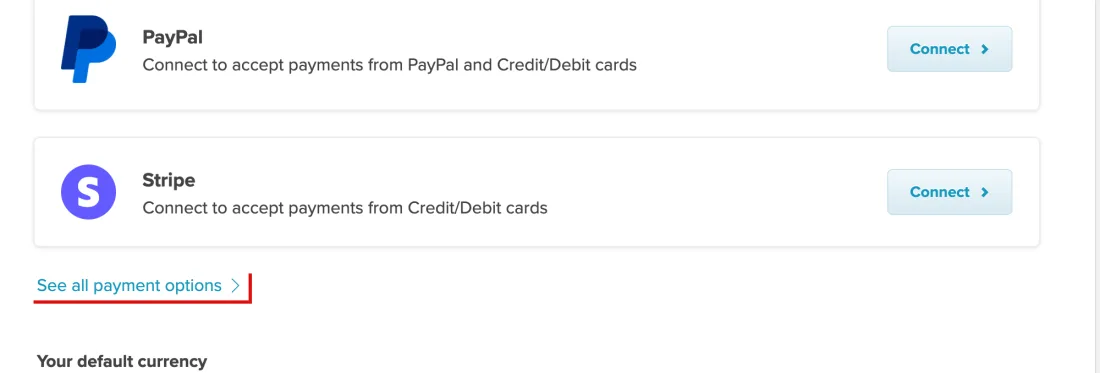
    Screenshot of Account, Settings, Payment Details: the processors offered in your region, each with a Connect button, and See all payment options for the full list, Payhip, with See all payment options outlined in red
    Outlined in red: See all payment options. Account, Settings, Payment Details: the processors offered in your region, each with a Connect button, and See all payment options for the full list, Payhip, screenshot taken 2026-09-16. Account details are masked.
  5. 5
    Upload the file, set the price, write the description, publish

    Payhip: Products, Add new product, Digital Product; upload the file or files, each up to 5GB (EXE, ISO, DMG, VBS, SCR and JAR must be zipped); title, price, cover image, description; a plus after the price makes it pay-what-you-want (5+); visibility Visible, Invisible while you refine, or Unlisted for a direct link only. Gumroad: New product on the Products dashboard; pick the type; price from free to USD 5,000 with the same plus for pay-what-you-want; describe; add files, pages and folders on the Content tab; publish. Neither charges anything to open the store.
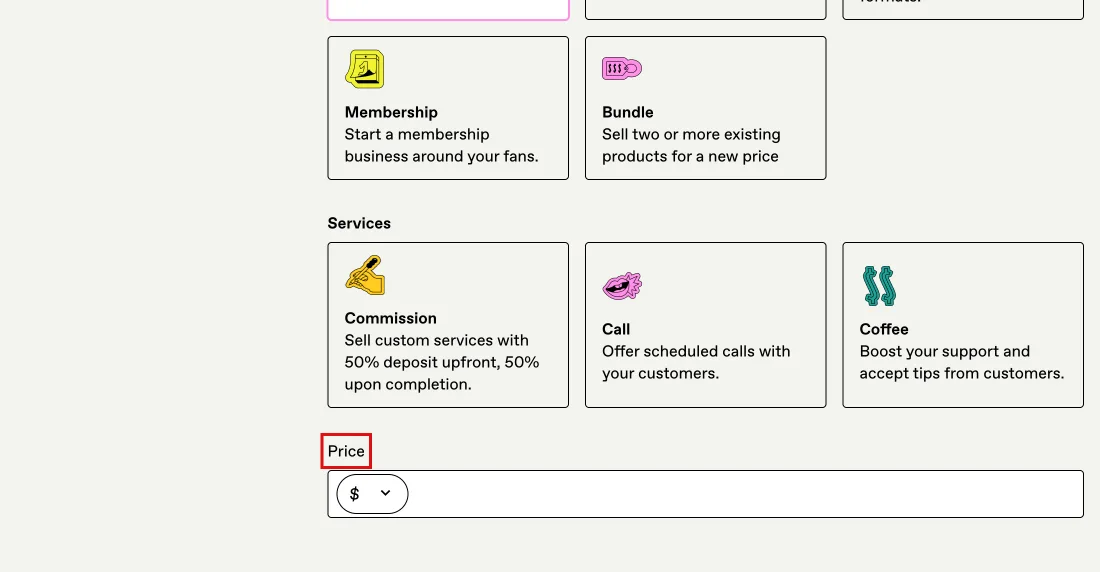
    Screenshot of Products, New product: the product-type tiles and the Price field at the bottom of the form, Gumroad, with Price outlined in red
    Outlined in red: Price. Products, New product: the product-type tiles and the Price field at the bottom of the form, Gumroad, screenshot taken 2026-09-16. Account details are masked.
    What it really costs to start
    PayhipFree Forever plan: $0 a month, all features and unlimited products, but Payhip charges a 5% fee on every transaction.source · checked 2026-09-07
    GumroadNo signup or subscription cost to start selling; Gumroad's cut is 10% + $0.50 per transaction on sales through your own profile or links.source · checked 2026-09-07
  6. 6
    Work out what each door keeps on your price

    Gumroad keeps 10% + $0.50 per transaction on sales through your own links. Lemon Squeezy keeps 5% + 50c, plus 1.5% for international cards, 1.5% for PayPal and 0.5% for subscriptions. Payhip's free plan keeps 5% and your processor keeps its own fee, for example Paystack's 1.5% + NGN 100 locally and 3.9% + NGN 100 internationally. Sellfy is $29 a month plus the processor's typical 2.9% + 30c. Shopify Basic is $25 a month plus 2% on third-party payments.

    What it really costs to start
    GumroadNo signup or subscription cost to start selling; Gumroad's cut is 10% + $0.50 per transaction on sales through your own profile or links.source · checked 2026-09-07
    Lemon SqueezyFree to open a store: $0/month, no card and no contract required. The only entry cost is the 5% + 50c fee taken per transaction.source · checked 2026-09-07
    PayhipFree Forever plan: $0 a month, all features and unlimited products, but Payhip charges a 5% fee on every transaction.source · checked 2026-09-07
    SellfyA 14-day free trial, then Starter at $29 /mo monthly or $22 /mo on the yearly plan, good for up to $10k in sales per yearsource · checked 2026-09-12
    ShopifyBasic at 19 US$/mo when paid yearly or $25 USD/mo paid monthly, after a free start; a custom domain bought through Shopify renews automatically each year on topsource · checked 2026-09-12
  7. 7
    Set the launch date after the hold, not before

    Gumroad needs a $100 balance, or a higher local minimum, and pays sales made through the previous Friday after a 7-day hold, weekly, monthly or quarterly, on a weekday set by the bank's country; bank transfers take 2 to 7 business days, PayPal 1 to 3. Lemon Squeezy needs $50, holds net sales 13 days, releases on the 14th and 28th, then takes 1 to 5 days to reach the bank: a sale on the 4th is paid on the 28th. Payhip and Sellfy pay at purchase.
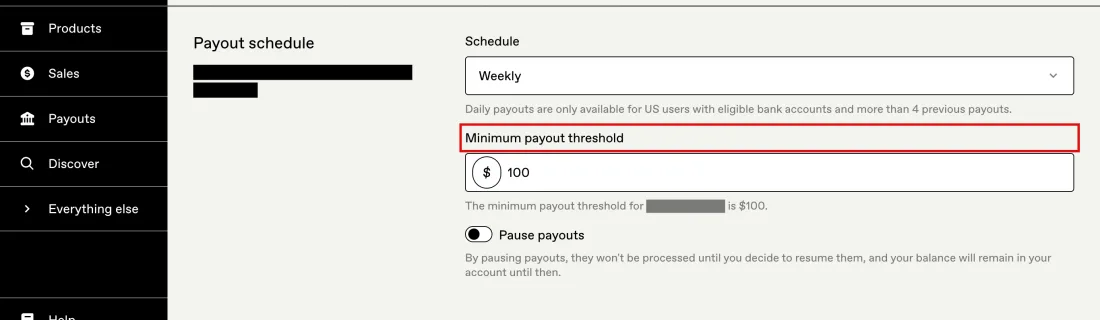
    Screenshot of Settings, Payments, the Payout schedule block: Weekly, the minimum payout threshold for your country, and Pause payouts, Gumroad, with Minimum payout threshold outlined in red
    Outlined in red: Minimum payout threshold. Settings, Payments, the Payout schedule block: Weekly, the minimum payout threshold for your country, and Pause payouts, Gumroad, screenshot taken 2026-09-16. Account details are masked.
    The gate before it pays anything
    Gumroad$100 USD balance, with higher local minimums in a long list of countriessource · checked 2026-09-08
    Lemon Squeezy$50 minimum payout threshold. Below it the balance stays Pending and rolls into the next payout cycle.source · checked 2026-09-07
  8. 8
    Do not change your payout country with money still pending

    Gumroad's unpaid amounts sit on a connected account specific to one country and cannot move to a new country's account; changing payout country forfeits them, and the confirmation names the amount and asks you to type I understand. Withdraw to zero first, then move.

  9. 9
    Read what ends it

    Gumroad may halt sales and suspend or terminate an account at any time, in its sole discretion, without cause or notice. Shopify may reject an application or cancel an existing account for any reason at its sole discretion. With Payhip and Sellfy the money is already in your processor, which is the quiet advantage of bringing your own.

    What takes it all away
    GumroadGumroad may halt sales and suspend or terminate an account at any time, in its sole discretion, without cause or notice.source · checked 2026-09-07
    Lemon SqueezySingle-vendor dependency: store, checkout, customer list and payouts all sit with one entity, now trading as Link, LLC, formerly Lemon Squeezy LLC.source · checked 2026-09-07
    PayhipSelling banned content risks the Payhip account being permanently deleted without prior notice.source · checked 2026-09-07
    ShopifyShopify may reject your application for an Account, or cancel an existing Account, for any reason, at its sole discretion; fees unpaid for 60 days after a suspension also let it terminate the Account, and you must be 18 or the age of majority to open onesource · checked 2026-09-12

Check these five before you sign up

  • Find your country on Gumroad's and Lemon Squeezy's 119-country bank lists first; if it is there, the bank is the door.
  • If not, check that PayPal can receive in your country: Gumroad pays PayPal in USD at 2%, Lemon Squeezy in 200+ countries in USD.
  • If PayPal skips you too, open Payhip and connect the processor that covers you: Paystack, Flutterwave, Xendit, Razorpay, Iyzico or one of the other eight, under Account, Settings, Payment Details.
  • Upload the file (up to 5GB, zip an EXE or DMG), set the price with a plus for pay-what-you-want, keep it Invisible until the page reads right, then make it Visible.
  • Work out the net on your own price: 10% + $0.50 at Gumroad, 5% + 50c at Lemon Squeezy, 5% plus your processor at Payhip.
  • Set the launch after the hold: 7 days and $100 at Gumroad, 13 days and $50 at Lemon Squeezy, at purchase on Payhip and Sellfy.
  • Withdraw to zero before changing your Gumroad payout country; pending amounts do not move.

FIG 1

Countries the platform itself can pay a seller in by bank

Counted from the published bank-payout lists on the date checked. Lemon Squeezy and Gumroad both list 119 and add PayPal as a fallback; Shopify Payments lists 40 country pages. Payhip and Sellfy are not drawn: they never hold the money, so the reach is the connected processor's, not theirs.

Gumroad, bank payouts119 countries1

plus PayPal in USD where bank payouts are unavailable

Lemon Squeezy, bank payouts119 countries4

plus PayPal in 200+ countries and regions

Shopify Payments40 countries15

elsewhere a third-party provider is required

0125

Gumroad help center, getting paid by Gumroad1
Show the numbers
RowValueSource
Gumroad, bank payouts119 countries1
Lemon Squeezy, bank payouts119 countries4
Shopify Payments40 countries15

Step one: the bank lists

  • Gumroad pays direct bank deposit in 119 countries, each in a named local currency; 29 of them carry a higher local minimum than its standard $100, for example 600 THB in Thailand and 40,000 KRW in Korea.
  • Lemon Squeezy pays bank transfers in its own list of 119 countries, converted at the mid-market rate. One footnote: since May 2024 Stripe accepts new accounts from India by invitation only, so an Indian seller without an approved Stripe account is paid through PayPal instead.
  • Shopify Payments covers 40 countries and regions; anywhere else the store must use a third-party provider and pays 2% on those payments on top of the plan.
  • The chart above puts the three lists side by side.

Step two: the PayPal fallback

  • Gumroad, where bank deposits are not available: PayPal, in USD, usually within 1 to 3 business days, 2% processing fee. Nothing else: no Payoneer, Wise, check, money order or wire.
  • Lemon Squeezy: PayPal in 200+ countries and regions, always in USD, to a verified Personal or Business account.
  • The catch is PayPal's, not theirs. PayPal does not let accounts registered in some countries receive money, and Gumroad names the result for Zambia, Syria, Russia and Iraq, where it has no bank route either and therefore currently no way to pay a creator.

Step three: bring your own processor

  • Payhip's 13 processors: PayPal, Stripe, Mollie, Square, Mercado Pago, Flutterwave, Paystack, Xendit, Midtrans, PayU, Razorpay, Iyzico and PayTabs. In most cases a seller connects PayPal plus one other for cards.
  • Paystack: Côte d'Ivoire, Ghana, Kenya, Nigeria and South Africa. Flutterwave: Nigeria, Ghana, Kenya, South Africa, Uganda, Rwanda, Zambia, Tanzania and Cameroon. Xendit: Indonesia, Malaysia, the Philippines, Thailand and Vietnam. Razorpay: sellers in India. Iyzico: sellers in Turkey.
  • Sellfy takes only a PayPal or Stripe account that can receive payments in your country; where neither can, it lets you offer only free products. A door for the first two groups, not this one.

Step four: connecting it

  • In the Payhip dashboard: Account, top right, then Settings, then the Payment Details tab. The gateways available in your region are listed; See All Payment Options shows the full 13.
  • PayPal and Stripe connect through on-screen prompts, Link PayPal Account or Accept Payments With Stripe.
  • Paystack connects with two keys: click Connect, log in to Paystack, open its API Keys page, paste the Public Key and Secret Key into Payhip, then paste Payhip's webhook URL into Paystack's Webhook URL field. The Payhip account currency must match the Paystack currency.
  • Paystack payments reach your account instantly after each transaction. Paystack's own fee, 1.5% + NGN 100 locally and 3.9% + NGN 100 internationally, is Paystack's, not Payhip's.

Step five: the file, the price, the page

  • Payhip: Products, Add new product, Digital Product. Upload with the Upload product file button, each file up to 5GB; an EXE, ISO, DMG, VBS, SCR or JAR only inside a ZIP.
  • Title, price, cover image, an embedded audio or video link if you have one, a description that says what the buyer gets. A plus after the price sets pay-what-you-want: 0+ allows any amount including free, 5+ sets a $5 floor.
  • Keep the product Invisible while the page is being refined, Unlisted for a direct-link launch, Visible for the store. Advanced options hold variations, an ebook flag for reduced EU VAT, a preview file, a sales limit and licence keys.
  • Gumroad's page is the same shape: New product, a type, a price from free to USD 5,000 with the same plus, a description, files and pages on the Content tab, publish. Neither charges anything to open the store.

What each door keeps

  • Gumroad: 10% + $0.50 per transaction through your own profile or links.
  • Lemon Squeezy: 5% + 50c, plus 1.5% for international cards, 1.5% for PayPal and 0.5% for subscriptions; no monthly fee.
  • Payhip Free Forever: 5% on every transaction, and the processor's own fee on top.
  • Sellfy: $29 a month after a 14-day trial, or $22 a month yearly, for up to $10k of sales a year, plus the processor's typical 2.9% + 30c.
  • Shopify Basic: 19 US$ a month paid yearly or $25 paid monthly, plus 2% on third-party payments.
  • The $20 file page works one sale through every cut.

The hold, the floor, and the weekday

  • Payhip and Sellfy: no payout cycle. The money is in your processor at purchase.
  • Gumroad: a minimum balance of $100 USD, or the higher local minimum; sales through the previous Friday paid after a 7-day hold, weekly, monthly or quarterly, daily for US users only. The weekday depends on the bank's country: Tuesday for most, Wednesday for euro and 16 other countries, Thursday for US banks, Friday for PayPal. Bank transfers take 2 to 7 business days.
  • Lemon Squeezy: $50, below which the payout stays Pending and rolls over weekly. Payouts are created on the 1st and 15th, net sales are held 13 days and released on the 14th and 28th, then 1 to 5 days to the bank. A sale on the 4th is paid on the 28th.
  • Set the launch date knowing which of those clocks you are on.

The clause about changing country

One Gumroad line deserves its own step. Unpaid amounts sit on a connected account specific to one country and cannot move to a new country's account, so changing your payout country forfeits them; the confirmation dialog names the amount and asks you to type I understand. If you are moving, withdraw to zero first.

What ends it

  • Gumroad may halt sales and suspend or terminate an account at any time, in its sole discretion, without cause or notice.
  • Shopify may reject an application or cancel an existing account for any reason, at its sole discretion.
  • Payhip may permanently delete an account for banned content without notice.
  • The quiet advantage of bringing your own processor: the money already left before any of those clauses could hold it.

What to do today

  1. Look your country up on the two 119-country lists.
  2. There: open that store and upload the file this afternoon. Not there, PayPal receives: take the USD route.
  3. Neither: open Payhip, connect Paystack, Flutterwave, Xendit, Razorpay or Iyzico under Payment Details, upload the file, set the price, make it Visible.
Cite this page

Earns.io (2026). PayPal and Stripe Skip Your Country. Payhip Pays You Through 13 Processors, at the Moment of Purchase. Figures checked 2026-09-14. Retrieved from https://earns.io/en/methods/selling-digital-files-where-paypal-and-stripe-skip

https://earns.io/en/methods/selling-digital-files-where-paypal-and-stripe-skip

Gumroad

gumroad.com

Sell digital products with no monthly fee and a per-sale cut.

Official site

This link pays this site nothing today. It goes to gumroad.com.

  • 28 published
  • 0 not published
  • 0 given two ways

Lemon Squeezy

lemonsqueezy.com

Digital product sales acting as merchant of record, so it handles tax.

Official site

This link pays this site nothing today. It goes to lemonsqueezy.com.

  • 28 published
  • 0 not published
  • 0 given two ways

Payhip

payhip.com

Digital product sales with a free tier that takes a larger cut.

Official site

This link pays this site nothing today. It goes to payhip.com.

  • 28 published
  • 0 not published
  • 0 given two ways

Sellfy

sellfy.com

Storefront for downloads, subscriptions and print-on-demand merch; a flat monthly plan capped by yearly sales instead of a transaction fee.

Official site

This link pays this site nothing today. It goes to sellfy.com.

  • 28 published
  • 0 not published
  • 0 given two ways

Shopify

shopify.com

Hosted online store from $19 a month; a 2% charge on sales through third-party payment providers unless you use Shopify Payments.

Official site

This link pays this site nothing today. It goes to shopify.com.

  • 28 published
  • 0 not published
  • 0 given two ways