Earns.io
Earns.ioA $5 Subscription Pays $4.75 on Kick and $2.50 on Twitch. Turn It On, and Put the Payday in the Calendar

A $5 Subscription Pays $4.75 on Kick and $2.50 on Twitch. Turn It On, and Put the Payday in the Calendar

What this is for

For a streamer with a small regular audience who wants the channel to take money. You get subscriptions switched on at Twitch, Kick or YouTube, the payout method set, and the date of the first payday, with the platform's cut known before you announce anything.

What you make

A channel that can take money: Twitch Affiliate onboarding finished with the payout method set, or Kick subscriptions enabled behind Stripe verification, or a YouTube Partner application showing In Progress, plus the first payout date and floor written in your calendar.

CHECKED 2026-09-1413 SOURCES29 NUMBERSUPDATED 2026-09-16
  • 27 published
  • 2 not published
  • 1 given two ways
What this counts
Typical earnings
95% of a $5 sub on Kick, 50% on Twitch
Startup cost
$0; the entry price is hours and viewers
Time to first payout
Twitch: 15 days after month end, at $50
Difficulty
3/5

Why this pays

The moment a channel starts earning is a button: Enable Subscriptions on Kick, the end of Affiliate onboarding on Twitch, Apply Now in the Earn tab of YouTube Studio on YouTube. Everything before it is a bar to clear; everything after it is a split, a floor and a date. The same $5 subscription is worth nearly twice as much on one platform as on another.

KickTwitchYouTube
The bar to the button5 total hours streamed25 followers, 4 hours, 4 days, 3 average viewers, inside 30 days1,000 subscribers plus 4,000 watch hours, or 10 million Shorts views
What you keep of a $5 sub$4.75, a 95% split$2.50 at 50%, rising to 60% and 70% on Plus pointsAd revenue through AdSense; no per-sub figure printed
The floor before a payoutNot published$50, or $100 by wire$100
Days after the month endsUp to 3015, then 1 to 5 in transit21 to 26

Twenty subscribers a month is $95 on Kick, $50 on Twitch, and an AdSense statement on YouTube. Twenty Twitch subscribers clear the floor in their first month; twenty YouTube channel members do not. Choose the door by the split and the floor, then put the payday in the calendar before the first sub lands.

The play, in three lines

  1. Turn on 2FA, check age and country on the payout side, and open the Achievements page of the platform you chose.
  2. Clear the bar: 5 hours on Kick, the four Twitch numbers inside one 30-day window, or one of YouTube's two thresholds. Then press the button and fill in onboarding with your legal name and the payout method you will keep.
  3. Write the payout date and the floor in the calendar: the 15th, the 21st or the 30th, next to $50 or $100.

The path above walks every click. What follows is the reasoning behind each step and the numbers you quote from.

Where the money comes from

  • Viewers who subscribe. A $5 monthly subscription, or KICKs tips. Kick passes 95% to you; Twitch 50% as a new Affiliate, 60% or 70% after three consecutive months at 100 or 300 Plus points.
  • Advertisers, through AdSense, on YouTube. Ad revenue runs through an AdSense for YouTube account, and fan funding, memberships, Super Chat, Super Stickers and Super Thanks, is for creators 18 and over.
  • Not the platform. Each one holds the viewer's money, takes its share, and releases the rest on its own calendar once your balance passes its floor.

The pain you are selling the cure for

A viewer with a regular evening habit wants to feel like a participant, a name in chat that the streamer knows, a badge, an emote, a ten-second thank-you on air. That is worth $5 a month to a surprising number of people, and it costs you nothing to sell. The pain is on your side: streaming for weeks without knowing which of the three doors is open to you, and announcing a subscription button before the money can actually reach your bank. Both are fixed by reading the payout page before the streaming page.

The path, step by step

Every figure below is read from the platform profile it belongs to, not written into this page. Follow a name to see every answer we have for that platform.

  1. 1
    Check you are old enough to be paid, and that your country is on both lists

    Twitch takes a 13 year old whose parent agrees to the Monetized Streamer Agreement. YouTube runs ads for anyone in the Partner Program but keeps memberships and Super Chat for 18 and over. Twitch says the Affiliate program is available globally; YouTube keeps a country list; Kick publishes none and defers to Stripe. Check the payout country before the streaming country.

    Minimum age
    Twitch13: you can sign up under 18 if you are over the age of 13, and your parent or guardian will need to agree to the terms of the Monetized Streamer Agreementsource · checked 2026-09-11
    YouTube Partner Program18 for channel memberships, Super Chat, Super Stickers and Super Thanks, each of which also requires living where that feature is available; ads themselves run through an AdSense for YouTube accountsource · checked 2026-09-11
  2. 2
    Turn on 2FA, then stream the four Twitch numbers inside one 30-day window

    Two-Factor Authentication must be on before onboarding can begin. Then, all inside the same 30 days: 25 followers, 4 hours streamed, 4 different days, and an average of 3 concurrent viewers on 4 of those days; days below 3 do not count against you. The Achievements section of the Creator Dashboard shows the last 30 days, which is why it disagrees with the all-time numbers on the dashboard. The invite arrives by email and Twitch notification, typically 24 to 48 hours after the fourth achievement, up to 72.
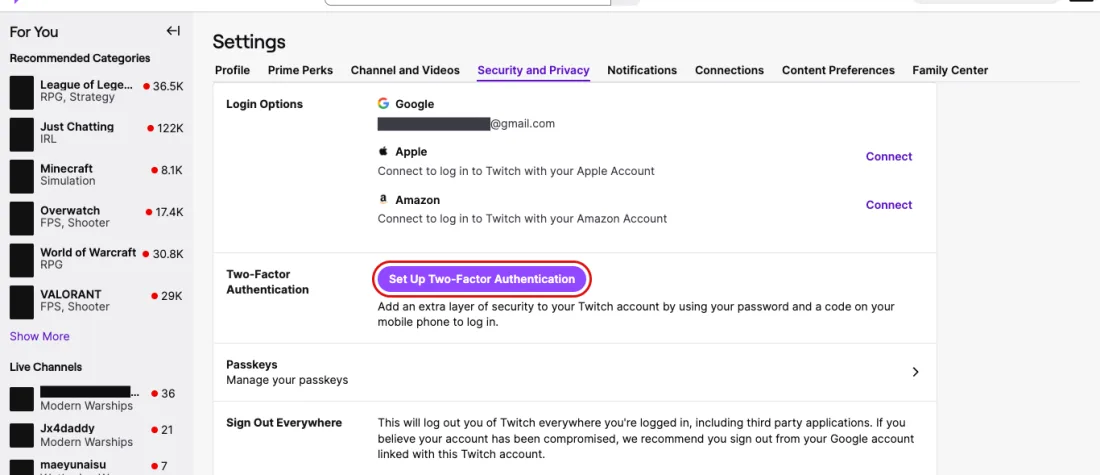
    Screenshot of Settings, Security and Privacy: Login Options and the Two-Factor Authentication button that must be done before onboarding, Twitch, with Set Up Two-Factor Authentication outlined in red
    Outlined in red: Set Up Two-Factor Authentication. Settings, Security and Privacy: Login Options and the Two-Factor Authentication button that must be done before onboarding, Twitch, screenshot taken 2026-09-16. Account details are masked.
  3. 3
    Finish Twitch onboarding from the Creator Dashboard: agreement, tax interview, payout method

    You do not need the invite email; onboarding opens from the Creator Dashboard once the four requirements show complete and your email address is verified. The tax interview is step 3: use your legal name exactly as on your tax documents, and expect processing of 24 to 48 hours. Choose the payout method carefully, because changing it later means restarting onboarding, and a change made after the 8th misses that month's payout. Affiliate status can be held on up to 5 accounts, each onboarded separately.
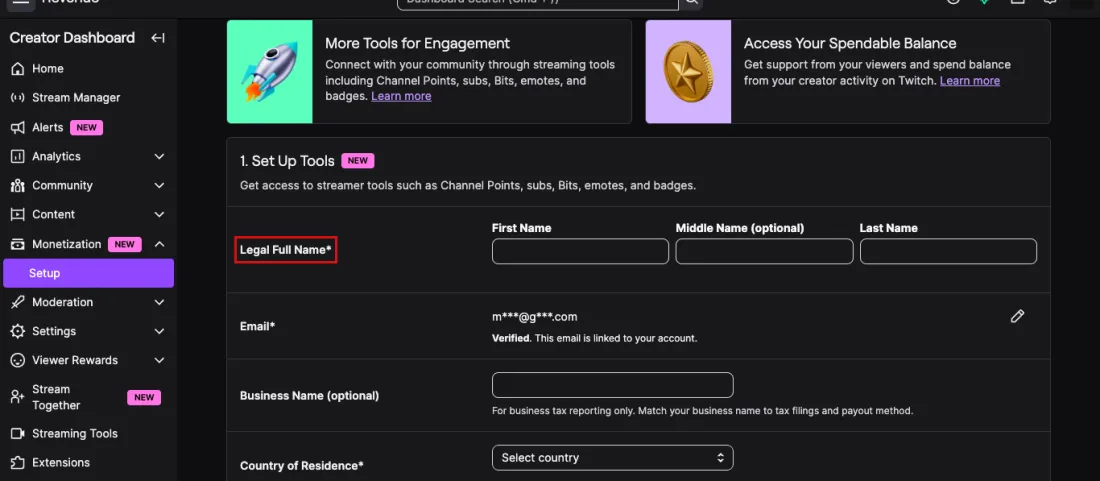
    Screenshot of Creator Dashboard, Monetization, Setup: step 1 of onboarding, legal name, verified email, business name and country before the agreement and tax interview, Twitch, with Legal Full Name* outlined in red
    Outlined in red: Legal Full Name*. Creator Dashboard, Monetization, Setup: step 1 of onboarding, legal name, verified email, business name and country before the agreement and tax interview, Twitch, screenshot taken 2026-09-16. Account details are masked.
    Ways to get paid
    TwitchChosen in payout onboarding, including PayPal and eCheck/local bank, which need no zip code; changing the method means restarting onboarding, and changes after the 8th miss that month's payoutsource · checked 2026-09-11
  4. 4
    On Kick, stream 5 cumulative hours, then click Enable Subscriptions

    Kick's requirement to enable subscriptions is 5 total hours streamed, and shorter streams over several days count. Progress shows in the Achievements section of the Streamer Dashboard; when the bar is met the Enable Subscriptions button appears there, and the setup steps take you through Stripe identity verification. Payouts go only to a bank account in a country Stripe supports; if Stripe is not available where you live you will not be paid, so read Stripe's list before the first hour.

    Screenshot of Streamer Dashboard, Achievements: Path to Creator, the 5-hour streaming requirement that turns subscriptions on through the revenue page, Kick, with Stream for a total of 5 hours outlined in red
    Outlined in red: Stream for a total of 5 hours. Streamer Dashboard, Achievements: Path to Creator, the 5-hour streaming requirement that turns subscriptions on through the revenue page, Kick, screenshot taken 2026-09-16. Account details are masked.
    Where you can be paid
    KickNot published as a list: to receive payouts your country needs to be supported by Stripe, and if Stripe is not available where you live you will not be able to receive payouts at this timesource · checked 2026-09-12
  5. 5
    On YouTube, cross one of the two thresholds, then apply from the Earn tab in Studio

    1,000 subscribers plus either 4,000 qualified watch hours in 12 months or 10 million qualified Shorts views in 90 days, with 2-Step Verification on and no active strikes. Select Get notified in the Earn area so YouTube emails you when you cross. Then: profile picture, YouTube Studio, Earn, Apply Now; Start to review and accept the Base terms; Start to set up or link an AdSense for YouTube account. The step shows In Progress and the review typically takes about 1 month; a rejected channel can appeal within 21 days or reapply after 30.

  6. 6
    Set your goals from what a $5 subscription becomes, not from the sticker

    Kick pays 95% of subscription revenue and of KICKs tips, $4.75 of a $5 sub. Twitch pays new Affiliates 50%, $2.50, rising to 60% after 3 consecutive months at 100 Plus points or more and 70% at 300. YouTube pays ad revenue and fan funding through AdSense for YouTube and prints no per-sub figure. Twenty subs a month is $95, $50 or an AdSense line, before the platform's floor.

    What you are paid in
    KickCash: 95% of subscription revenue and of KICKs tips, so $4.75 of each flat $5 monthly subscription, with the other 5% taken as a processing fee; earning requires KICK Affiliate or Partner statussource · checked 2026-09-12
    TwitchCash: the standard subscription revenue split for Affiliates is 50/50 between you and Twitch, with enhanced rates for eligible creators through the Plus Programsource · checked 2026-09-11
    YouTube Partner ProgramCash through an AdSense for YouTube account: advertising revenue from Watch Page ads and Shorts Feed ads, plus Shopping, memberships and fan funding where availablesource · checked 2026-09-11
  7. 7
    Put the payout dates and floors in the calendar before the first sub lands

    Twitch: Net15, the payout is initiated 15 days after the month ends once the balance is $50 or more ($100 by wire), and lands 1 to 5 days later; April's revenue is initiated on May 15. YouTube: the month is finalised between the 7th and 12th and paid between the 21st and 26th once the balance is $100 with no holds. Kick: the first payout up to 30 days after month end, after Stripe verification, then 2 to 3 business days in the US or 3 to 7 abroad; Kick publishes no threshold figure.

    Time from earning to money in hand
    KickVerified streamers choose weekly or monthly payouts, non-verified get monthly only; once initiated, a US ACH transfer lands in 2 to 3 business days and an international deposit usually in 3 to 7 business dayssource · checked 2026-09-12
    TwitchNot checked yet
    YouTube Partner ProgramEarnings for a month are finalized between the 7th and 12th of the next month and paid between the 21st and 26th, once the balance has reached the payment threshold and there are no holds; a hold removed after the 20th rolls the balance to the following monthsource · checked 2026-09-11
  8. 8
    Know what happens to a balance that never reaches the floor

    On Twitch a balance under the threshold stays on the account and is paid once it reaches the threshold with a valid payout method, even after leaving and rejoining the program. On YouTube a hold removed after the 20th rolls the balance into the following month, and a channel with active Community Guidelines strikes cannot be paid. Kick prints nothing about a balance under its unpublished threshold.

    How a balance can be lost
    TwitchEarned revenue is not lost: an invalid payout method holds the balance until you update it, and a balance under the threshold remains on the account, payable only if you rejoin as an Affiliate or Partner and reach the thresholdsource · checked 2026-09-11
    YouTube Partner ProgramPayment requires no holds on the account and compliance with the AdSense Program policies and the AdSense for YouTube Terms and Conditions; a channel with active Community Guidelines strikes cannot join, and membership requires staying activesource · checked 2026-09-11

Check these five before you sign up

  • Turn on 2FA on Twitch and 2-Step Verification on YouTube before you do anything else; both are hard gates on onboarding and application.
  • Stream the four Twitch numbers inside the same 30 days and read them in Achievements, not on the all-time dashboard; the invite comes 24 to 72 hours after the fourth.
  • In Twitch onboarding, type your legal name exactly as it appears on your tax documents, and pick the payout method you will keep; changing it restarts onboarding and a change after the 8th misses the month.
  • On Kick, read Stripe's supported-country list before the first hour; without Stripe there is no payout. After 5 cumulative hours, the Enable Subscriptions button appears in the Streamer Dashboard.
  • On YouTube, select Get notified in the Earn area, then apply from Earn, Apply Now once you cross 1,000 subscribers with 4,000 hours or 10 million Shorts views; expect about a month of review.
  • Budget from $4.75, $2.50 or an AdSense line per $5 subscription, and from the floors: $50 on Twitch, $100 on YouTube, unpublished on Kick.
  • Write the payout dates down: Twitch initiates on the 15th, YouTube pays the 21st to 26th, Kick up to 30 days after month end plus transit.

KICK PUBLISHES THIS TWO WAYS

Requirements to become a KICK Partner

Two help articles a fortnight apart both describe becoming a KICK Partner and set two different bars. Read together they describe two things: the first unlocks subscriptions, the second is an application to a program that pays per stream. Kick uses one name for both.

Both pages were live when we read them. This site has not asked Kick which figure is current, and does not know.

Step one: age and country, on both doors

  • Twitch: 13 to be monetised, with a parent or guardian agreeing to the Monetized Streamer Agreement under 18. YouTube: ads for anyone in the program; memberships, Super Chat, Super Stickers and Super Thanks at 18.
  • Twitch says the Affiliate program is available globally. YouTube requires you to live where the Partner Program is available. Kick publishes no list: your country must be supported by Stripe, and if Stripe is not available where you live you will not be able to receive payouts.
  • Read the payout country before the streaming country. The second is nearly always yes; the first is where the door closes.

Path one: Twitch, four numbers and an onboarding form

  • Two-Factor Authentication first; onboarding cannot begin without it.
  • Inside the same 30 days: 25 followers, 4 hours streamed, 4 different days, and an average of 3 concurrent viewers on 4 different days. Three people watching at once, not three views in total; days below 3 do not count against you.
  • Progress lives in the Achievements section of the Creator Dashboard, which counts the last 30 days. The main dashboard shows all-time figures, which is why the two disagree.
  • The invite arrives by email and notification, typically in 24 to 48 hours, sometimes up to 72. The email is a notification, not a key: onboarding opens from the Creator Dashboard once the requirements show complete and the email address is verified.
  • Onboarding has the agreement, the tax interview at step 3, and the payout method. Type the legal name exactly as on tax documents; the interview processes in 24 to 48 hours.
  • Choose the payout method you intend to keep. Changing it means restarting onboarding, and a change after the 8th misses that month's payout. Affiliate status can be held on up to 5 accounts, each onboarded separately.

Path two: Kick, five hours and one button

  • 5 total hours streamed, cumulative, so shorter streams across several days count. Progress shows in the Achievements section of the Streamer Dashboard.
  • Once met, Enable Subscriptions becomes available there. Click it and follow the setup steps, which run through Stripe: payouts go only to a bank account in a Stripe-supported country after identity verification. US streamers can add an instant payout to a debit card capped at $9,000 per payout. PayPal is not a payout option.
  • Kick uses Partner for two different things, and the contradiction block above shows both: the 5-hour bar that unlocks subscriptions, and a separate application needing 250 followers, 30 hours, 75 average viewers, 25 active subscriptions, 250 unique chatters and 3 VODs in 30 days. The button is the first one.

Path three: YouTube, a threshold and an application

  • Either door: 1,000 subscribers with 4,000 qualified watch hours in the last 12 months, or 1,000 subscribers with 10 million qualified Shorts views in the last 90 days. Watch hours from Shorts in the Shorts Feed do not count toward the 4,000.
  • Also: live where the program is available, no active Community Guidelines strikes, 2-Step Verification on, advanced features access, one active AdSense for YouTube account linked. Get notified in the Earn area of Studio emails you when you cross.
  • The application: profile picture, YouTube Studio, Earn, Apply Now; Start to accept the Base terms; Start to set up or link AdSense. Get Reviewed then shows In Progress, typically for about 1 month.
  • A rejection can be appealed within 21 days, or reapply after 30 days, 90 for a repeat. Updated Partner Program terms must be accepted in Studio by January 31, 2027.

What a subscription becomes

  • Kick: 95% of subscription revenue and of KICKs tips, $4.75 of a $5 subscription; 5% is a processing fee.
  • Twitch: 50% for new Affiliates, $2.50 of the same $5. 100 Plus points or more for 3 consecutive months moves you to 60%; 300 or more to 70%.
  • YouTube: ad revenue and fan funding through AdSense, no per-subscription figure printed.

The floor

  • Twitch: $50 with ACH, eCheck, PayPal or check; $100 by wire.
  • YouTube: $100 for a US dollar account, after a $10 verification threshold and a $10 payment method threshold; A$100 or C$100 in those currencies.
  • Kick: the help page titled payout schedule, thresholds and methods names no threshold figure at all.

FIG 1

Days from the end of the month to the day the platform releases the money

Each bar starts at the last day of the month the revenue was earned in. Transit time after release is not included: 1 to 5 days on Twitch, 3 to 7 business days on Kick outside the US. YouTube's bar is the first day of its 21st to 26th window.

Twitch, Net1515 days6

initiated 15 days after the month ends, once the balance is $50 or more

YouTube, AdSense payment window21 days11

paid between the 21st and 26th, once the balance is $100 or more

Kick, first monthly payout30 days2

first payout up to 30 days after the end of the month, after Stripe verification

030

Twitch help, Twitch Affiliate Program FAQ6
Show the numbers
RowValueSource
Twitch, Net1515 days6
YouTube, AdSense payment window21 days11
Kick, first monthly payout30 days2

The gap between the stream and the bank

The chart above counts the days from the end of a month to the day the platform releases it. Twitch is Net15: initiated 15 days after the end of the month in which the revenue was earned, so April's revenue is initiated on May 15, landing 1 to 5 days later depending on the method. YouTube finalises a month between the 7th and 12th of the next and pays between the 21st and 26th, once the balance is over the threshold and there are no holds. Kick processes the first payout once Stripe verification is complete and the next monthly cycle ends, up to 30 days after the end of the month; verified streamers then choose weekly or monthly, and transit is 2 to 3 business days by US ACH, minutes by US instant payout, usually 3 to 7 business days internationally. Stripe's 1.50% currency conversion fee on a non-USD account is absorbed by Kick.

What happens to money that never reaches the floor

  • Twitch: a balance under the threshold stays on the account and is paid once it reaches the threshold with a valid payout method, even after leaving the program and rejoining.
  • YouTube: a hold removed after the 20th rolls the balance into the following month, and payment requires compliance with the AdSense policies; a channel with active strikes cannot join.
  • Kick prints nothing on the subject. The AdSense threshold page reads the same $100 rule from the website side.

What to do today

  1. Turn on 2FA.
  2. Open the Achievements page on the platform you chose and write down the numbers it is counting. Read Stripe's country list if the platform is Kick.
  3. Stream. When the button appears, fill in onboarding with your legal name and the payout method you will keep.
  4. Put the 15th, the 21st or the 30th in the calendar, next to the floor you have to reach first.
Cite this page

Earns.io (2026). A $5 Subscription Pays $4.75 on Kick and $2.50 on Twitch. Turn It On, and Put the Payday in the Calendar. Figures checked 2026-09-14. Retrieved from https://earns.io/en/methods/getting-paid-to-stream

https://earns.io/en/methods/getting-paid-to-stream

Kick

kick.com

Live streaming with a 95/5 revenue split on $5 subscriptions and KICKs tips, paid only through Stripe.

Official site

This link pays this site nothing today. It goes to kick.com.

  • 27 published
  • 2 not published
  • 1 given two ways

Twitch

twitch.tv

Live streaming; Affiliate status opens at 25 followers, 4 hours over 4 days and 3 average viewers, with a standard 50/50 subscription split.

Official site

This link pays this site nothing today. It goes to twitch.tv.

  • 27 published
  • 2 not published
  • 1 given two ways

YouTube Partner Program

youtube.com

Ad revenue and fan funding for channels past 1,000 subscribers plus 4,000 watch hours or 10 million Shorts views, paid through AdSense.

Official site

This link pays this site nothing today. It goes to youtube.com.

  • 27 published
  • 2 not published
  • 1 given two ways